Asynchronous video is supposed to save time. In practice it produces a recording that nobody watches, a transcript nobody reads, and a frustrated recorder who shrugs and falls back to writing a paragraph in Slack. The 8-minute walkthrough you made on Tuesday gets opened by three of seven people, and only two of those three make it past the four-minute mark. The other four assume the recording said what they expected and they were wrong about half the time.
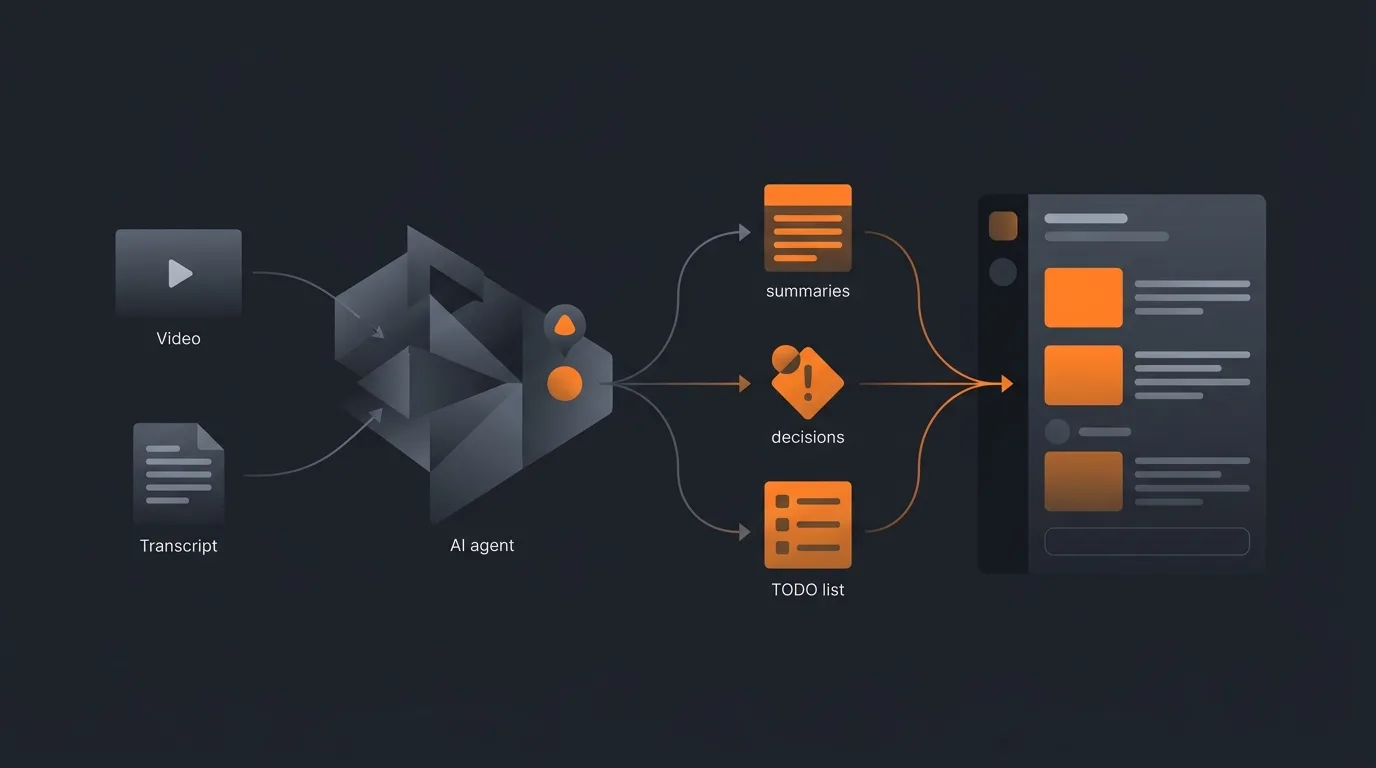
An AI agent for Loom video summary closes the gap. The recorder hits stop, the transcript becomes available, the agent reads it, and a digest lands wherever the team works. Decisions, action items, and a three-sentence preview at the top. The team gets the value of the recording in 90 seconds, and the people who need the full context still have the recording.
What this agent does
The agent listens for the Loom new-recording webhook. When a video is finished and the transcript is ready, it pulls the transcript via the Loom API. It runs three extraction passes: a 3-sentence overview, a decisions list with timestamps, and an action-items list with proposed owners. It assembles a draft summary in the recorder's preferred format and posts it as a draft to the configured destination, tagged with the recorder.
What the agent does not do:
- it does not publish the summary to the team without the recorder's click.
- does not delete the Loom.
- does not change the Loom's permissions.
- does not transcribe videos that lack a Loom-generated transcript.
For the broader pattern, see AI agent newsletter from notes, which sits in the same write-from-transcript family.
Sources of truth
- Loom transcript. Pulled via the Loom API once the video processes (usually 1-3 minutes after upload). The transcript has speaker turns and timestamps.
- Loom video metadata. Title, recorder, workspace, duration, viewer-share settings. Used for routing.
- Workspace roster. Names, roles, and tool handles. Used to resolve "Sarah" to a Slack user ID or a Notion mention.
- Output: a draft summary in the configured destination. The recorder approves and shares.
The agent does not browse Slack history, calendars, or company docs. The transcript is the unit. For more on scope discipline, see how to limit agent actions.
What goes in a good summary
The summary is not "a transcript with bullets". It has four sections, and short videos collapse the last two.
- Three-sentence overview at the top. What the video covers, who it is for, why it matters. The viewer reads three sentences and decides whether to commit to the rest.
- Decisions section. Every decision named in the video with its timestamp. "We will ship the dark mode feature in May (2:14). We will skip the Android variant for v1 (4:48)." Each one clickable to jump to the moment.
- Action items section. Each follow-up with a proposed owner and a proposed due date. If the recorder said "Sarah, can you handle the legal review by Friday?" the action becomes "Legal review (owner: Sarah, due: Friday, video timestamp 6:21)".
- Sectioned walkthrough (long videos only). If the video is over 15 minutes, the agent splits it into 3 to 5 sections, each with a one-sentence summary and a jump-to timestamp.
The summary is markdown by default.
- For Slack, it renders to Slack's mrkdwn.
- For Notion, it inserts as a structured block.
- For email, it renders to HTML with the standard inlined styles.
The destination determines the format; the content is the same.
Routing the summary
The recorder configures one destination per workspace (not per video) so the routing is stable.
Draft post. The agent posts the draft in the destination, addressed to the recorder. The recorder gets a notification, opens the draft, edits if needed, and clicks share.
Share action. The agent expands the audience: posts in the team channel for Slack, makes the Notion doc visible to the workspace, sends the email to the configured distribution list. The Loom link is included.
Action-item routing. When the recorder shares, the action items optionally become tasks in the team's task tool (Linear, Asana, Notion). This step requires the recorder to enable the connector; otherwise the action items live in the summary only. For more on agent monitoring patterns, see how to monitor agent activity.
Guardrails
- Recorder approval before publish. The team does not see the summary until the recorder clicks share. Casual asides ("I had this insight at 3 a.m. and I am not sure it is right") do not become quoted public summaries.
- Read scope only on Loom. No delete, no permission change, no recording-edit. Workspace admin powers are not used.
- Skip videos without transcripts. Rare, but happens (very short clips, locale issues). The agent logs the skip and moves on.
- Sensitive-channel opt-out. Videos posted to a "confidential" or "leadership" channel skip summary generation, or send the draft to the recorder only with no share button.
- Audit log of every summary. Reviewable for 90 days. Includes what was drafted, what the recorder edited, what was shared, with whom.
- Three-section format is the default. Recorders can customise, but they cannot remove the overview or the action items. Those are the two things viewers actually need.
For the broader safety philosophy, see AI agent safety and guardrails.
Common mistakes
- Auto-sharing on record. A Loom is informal by nature. Quoting it into Slack without a quick review puts words in the recorder's mouth that they did not intend for a digest.
- Long-form summaries. A summary longer than the video defeats the point. Hard cap at 250 words for the overview, 5 bullets per section.
- Skipping action items. The overview tells me what; the action items tell me what is next. Without action items, the summary is interesting but not useful.
- One-destination-per-video. Stable per-workspace routing keeps the team's brain unstrained. Per-video routing creates "where did the agent put it this time" confusion.
- Letting the agent reword aggressively. The recorder's phrasing carries tone; aggressive rewording strips it. Light editing only.
- Treating this as a replacement for the recording. The recording is the source of truth. The summary is an index. The team still goes to the recording for nuance.
Frequently asked questions
Can an AI agent summarise a Loom video?
Yes. The agent reads the Loom transcript (Loom provides one automatically a minute or two after recording), extracts decisions and action items, and posts a digest into the channel the recorder configured. The summary includes a 3-sentence overview, the timestamps of each decision, and an action-items list with proposed owners. The recorder reviews and shares; the digest never auto-publishes to the team without that step.
Does the agent watch the video?
No, it reads the transcript. Loom transcribes automatically and exposes the text via the API. The agent does not run video analysis, does not look at the screen recording, and does not OCR slides. The transcript is the unit. Videos with no transcript available (very rare) are skipped with a note.
Where does the summary go?
Wherever the recorder configured. Most teams route to Slack, Notion, or email. The summary lands in a draft state with one-click share buttons. The recorder edits if needed and clicks share. The agent never posts the summary publicly without that approval, because async-video summaries can include casual asides that the recorder did not realise would be quoted in a digest.
How does it handle a 90-minute Loom?
Long Looms get a sectioned summary. The agent identifies natural breakpoints in the transcript (long pauses, topic transitions, screen-shared file changes) and produces a multi-section digest. Most teams would rather watch a 90-minute Loom in 3-minute summaries than commit to the full hour and a half. Each section is independently navigable to its timestamp.
Does the agent need workspace admin access?
Read access on the workspace videos and a webhook subscription on the new-recording event. That is it. It does not need permission to delete videos, change permissions, or modify recordings. The blast radius is bounded to producing summaries, which are drafts the recorder approves.
Three takeaways before you close this tab
- Transcript-first, recorder-approves. No watching, no auto-publish.
- Three sections. Overview, decisions, action items. Long videos add a fourth.
- Stable routing per workspace. Per-video routing breaks team brains.
Sources
- Loom Developers, "Loom API: Videos and Transcripts endpoints", retrieved 2026-05-13, dev.loom.com
- Loom Support, "How transcripts work in Loom", retrieved 2026-05-13, support.loom.com transcripts
- Harvard Business Review, "The Future of Flexibility at Work", retrieved 2026-05-13, hbr.org future of flexibility at work
- GitLab Handbook, "All-Remote and asynchronous communication", retrieved 2026-05-13, handbook.gitlab.com asynchronous
- Atlassian, "How to take truly useful meeting notes", retrieved 2026-05-13, atlassian.com meeting notes