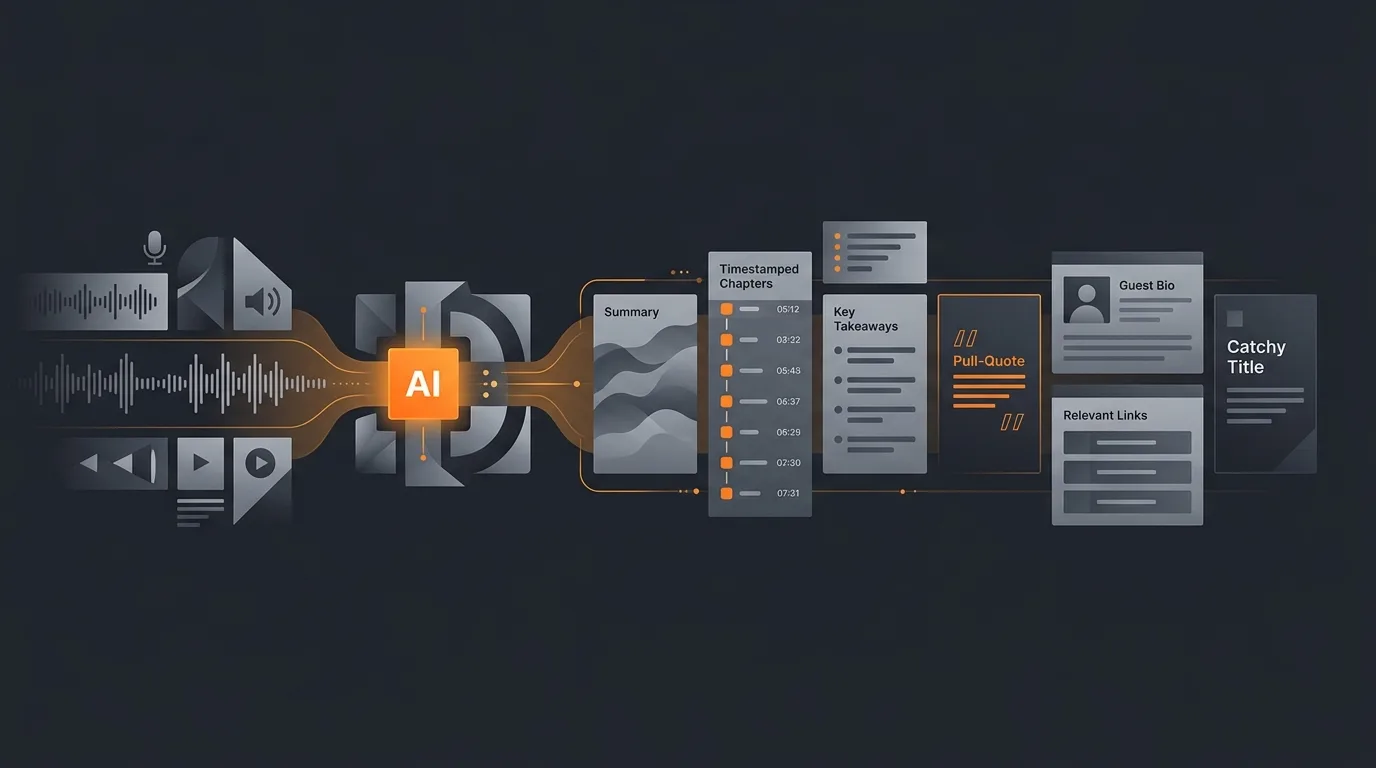
Yes, an AI agent can turn a finished podcast episode into a complete set of show notes. Hand it the transcript, or the audio with timestamps, and it returns a tight episode summary, timestamped chapters, key takeaways, pull-quotes, a guest bio, the links mentioned, an SEO-friendly title and description, and a few social snippets, all in your house voice and formatted to paste straight into your host or CMS. The point is not to remove you from the process. It is to do the slow reading-and-drafting pass so your time goes to a quick review instead of a blank page.
This guide is about the post-production write-up, not editing the audio. It assumes the episode is recorded and you have a transcript or a transcribed audio file ready to feed in.

What show notes automation does
Show notes are the text that lives under an episode: the part that tells a listener what the conversation covered, lets them jump to the segment they want, and gives search engines and podcast directories something to index. Good notes are the difference between an episode that gets found and shared and one that sits in a feed. The trouble is they take real time to write well, and that time competes with recording the next episode.
An agent automates the assembly. It reads the full transcript end to end, which is the part humans dread, then structures what it found into the standard sections: summary, chapters, takeaways, quotes, guest details, and links. It drafts a title and description tuned for discovery, and it spins out social posts you can use to promote the drop. You get a finished document, not a pile of raw notes, and you spend your attention on judgment calls rather than transcription and formatting. The same pattern shows up across creator work, which is why AI agents for podcasters and AI agents for content creators tend to start with exactly this task.
Why show notes eat your week
Anyone who has shipped a weekly show knows the notes are where the schedule slips. The reasons are consistent:
- You have to re-consume the episode. To pull the best quotes and write an honest summary, you basically have to listen to or read the whole thing again. For a 60-minute conversation, that is an hour gone before you type a word.
- The sections are fiddly. Chapters need accurate timestamps. Takeaways need to be genuinely useful, not filler. The guest bio has to be correct. The links have to be real and clickable. Each one is small; together they add up.
- Titles are their own job. A good episode title is specific enough to earn a click and clear enough to tell a stranger what they will learn. Writing one that does both, every week, is harder than it looks.
- It is low-status work that still has to be perfect. Nobody is excited to write show notes, but a typo in a guest's name or a dead link in front of your whole audience is the kind of mistake people notice.
So notes get rushed, posted late, or skipped down to a one-line blurb. The episode loses the searchable text and the shareable hooks that would have helped it travel. Automating the draft removes the dread without removing the care, because a person still does the final read.
The workflow, step by step
The agent runs the same sequence every episode, which is what makes the output consistent. Describe the flow once and it repeats:
- Ingest the transcript. You provide the episode transcript or a transcribed audio file. If it carries timecodes, the agent keeps them; they become the basis for the chapter list.
- Read and segment. The agent reads the whole episode and breaks it into topic segments, marking where each new thread of the conversation begins.
- Structure the notes. It writes the summary, builds the timestamped chapter list, pulls takeaways and the strongest quotes, assembles the guest bio, and collects every link and resource named in the conversation.
- Draft the title and description. It proposes an episode title and a description written for both a human skimming a feed and a search engine indexing the page.
- Apply your voice. Every section is written in the house style you set, so the notes read like your show rather than a generic template.
- Output ready to paste. The agent formats the whole thing for your host or CMS, so you copy a finished block rather than reformatting fragments.
If you are new to describing a job for an agent to run, how to set up your first AI agent walks through turning a plain-language description like this into a workflow you can rerun for every episode.
What goes into a complete set of notes
A complete set of show notes is more than a summary. Here is what the agent assembles, and what each piece is for.
Episode summary
A tight paragraph, usually three to five sentences, that tells a prospective listener what the episode covers and why it is worth their time. It leads with the hook, names the guest and their relevance, and previews the payoff without spoiling it. This is the text most likely to be read, so the agent keeps it concrete.
Timestamped chapters
A list of segments with their start times, so a listener can jump to the part they care about and a podcast player can show chapter markers. The agent maps each topic shift to its timecode from the transcript. Where the input has no timecodes, it still labels the segments and flags that the marks need a human pass.
Key takeaways and pull-quotes
Three to seven takeaways that capture the ideas worth remembering, plus a handful of pull-quotes lifted verbatim from the strongest moments. The quotes do double duty: they enrich the notes and they feed your promotion, since a sharp line from the guest is the easiest thing to turn into a social post or an audiogram caption.
Guest bio and links
A short, accurate bio of the guest with their title and company, plus a resources block listing every book, tool, website, and handle named in the conversation. The agent pulls these from what was actually said. A reference that was mentioned but never spelled out gets flagged for you to confirm rather than guessed, so the links you publish are real.
Titles, descriptions, and social snippets
The title and description are where show notes earn discovery. The agent drafts an episode title that is specific and clickable, then a description written for both a human in a feed and a directory's search index. It works the guest's name and the core topic into the opening, since that is what people and search both look for first. If you want the reasoning behind writing for search at the same time as writing for people, an AI agent for content creators covers the same balance across formats.
From the same source material, the agent also drafts the social snippets that announce the episode: a short post for each platform, anchored on a pull-quote or a single sharp takeaway, sized to fit. That is the on-ramp to wider distribution. Once you have those drafts, an agent for social media scheduling can queue them, an AI agent for LinkedIn content can shape a longer post for that audience, and content repurposing can turn the full episode into clips, threads, and a written piece. The show notes become the seed for everything downstream.
One adjacent move worth naming: the same takeaways that feed your socials can feed your list. If you send a regular email, an AI agent that drafts a newsletter from notes can turn the episode write-up into a subscriber email, so a single recording fills the feed, the timeline, and the inbox.
Keeping your house voice
Generic show notes are easy to spot and easy to ignore. The reason to use an agent rather than a one-size template is that it can match how your show actually sounds. You set the voice once, either by pointing the agent at a few past episodes whose notes you liked or by describing the style in plain words: punchy or warm, first person or neutral, list-heavy or prose, emoji or none, the section order you always use.
The agent then applies that pattern across every section, so the summary, the takeaways, and the social snippets all read like your brand rather than a stock format. Consistency is part of the value. When every episode's notes follow the same shape and tone, regular listeners know where to look and your page reads like a deliberate product. Because the draft is a starting point you review, any phrasing the agent gets slightly off is a quick edit, not a reason to start over.
If the deeper question of why an agent can do this judgment work at all is on your mind, what is an AI agent explains the difference between a tool that follows a rigid template and an agent that reads context and writes to a style, and the glossary defines the terms as they come up.
Where the human stays in the loop
The recommended flow keeps a person on the final read, and not as a formality. Show notes carry your name, your guest's name, and the links your audience will click, so the review matters. Three things are worth a human eye every time:
- Names and titles. Confirm the guest's name, role, and company are spelled and stated correctly. This is the error people remember.
- Timestamps and links. Spot-check that the chapter marks line up and that every link resolves. If the input lacked timecodes, this is where you add them.
- Tone and claims. Read the summary and takeaways for anything off-voice or any claim that overstates what the guest said. A light edit here protects your credibility.
The agent does the heavy lifting so the review is fast: you are checking and adjusting a finished draft, not building one. That is the right division of labor. The machine handles the volume and the formatting; the human keeps the judgment and the accountability. The same principle holds for any episode-derived asset, like a video summary, where the draft is automated but the publish decision stays with a person.
How Gravity handles podcast show notes
Gravity is an AI agent platform. You describe what you want in plain words: feed it the episode transcript, tell it your house voice and the section order you use, and an expert-built agent returns a complete set of show notes. No template wrangling, no prompt engineering on your side.
For each episode the agent ingests the transcript, segments the conversation, writes the summary, builds the timestamped chapters, pulls takeaways and quotes, assembles the guest bio and links, drafts an SEO-friendly title and description, and produces social snippets, all in your voice and formatted to paste into your host or CMS. It hands the finished draft back in about 60 seconds. You review it, fix the few things only you would catch, and publish. Subscription pricing: a free tier, then plans from $20/month that include usage.
Because Gravity runs the agent and carries the work, you describe the outcome once and rerun it for every episode rather than rebuilding a process each week. Show notes are a strong first job to hand over: the output is well defined, the value is obvious the first time you skip the hour of re-listening, and a human still owns the final read. When you want the rest of the episode to travel further, the same draft feeds your repurposing and scheduling agents from one source.
FAQ
Can an AI agent write podcast show notes from a transcript?
Yes. Give the agent the episode transcript, or the audio with timestamps, and it produces a full set of show notes: a tight summary, timestamped chapters, key takeaways, pull-quotes, a guest bio, the links mentioned, an episode title, a description, and social snippets. You set the house voice and the section order once, then review the draft before it goes live in your host or CMS.
Does the agent keep accurate timestamps for chapters?
It keeps the timestamps that exist in the input. If the transcript carries timecodes, the agent maps each chapter to the moment its topic begins and uses those marks for the chapter list. If your input has no timecodes, the agent still segments the episode into labeled sections, but a human should add or verify the marks before publishing, since invented times would be wrong.
Will the show notes sound like my show or generic?
They follow whatever voice you give the agent. Point it at a few past episodes you liked, or describe your style in plain words: punchy or warm, first person or neutral, emoji or none. The agent matches that pattern across the summary, takeaways, and social snippets. The draft is a starting point you review, so any house phrasing the agent missed is a quick edit, not a rewrite.
Does the agent publish the notes automatically?
Only if you want it to. The default is a finished draft, formatted and ready to paste into your podcast host or CMS, that a person reviews before it goes live. You can connect the agent to your host so it posts directly, but the recommended flow keeps a human in the loop for the final read, since show notes carry your name, your guest's name, and the links your audience clicks.
Can the agent pull out the links and guest details mentioned in the episode?
Yes, the ones the conversation actually names. The agent scans the transcript for books, tools, websites, social handles, and the guest's title and company, then lists them in a clean resources block. Anything spoken but not spelled out, like a URL nobody read aloud, is flagged for you to fill in rather than guessed, so the links you publish are real.
How long does it take to turn an episode into show notes?
Once the transcript is ready, the agent returns a complete draft in about a minute. The slow part of show notes was never the typing; it was reading the whole episode back, finding the good quotes, and writing the summary. The agent does that pass for you, so your time goes to reviewing and lightly editing rather than building the page from a blank screen.