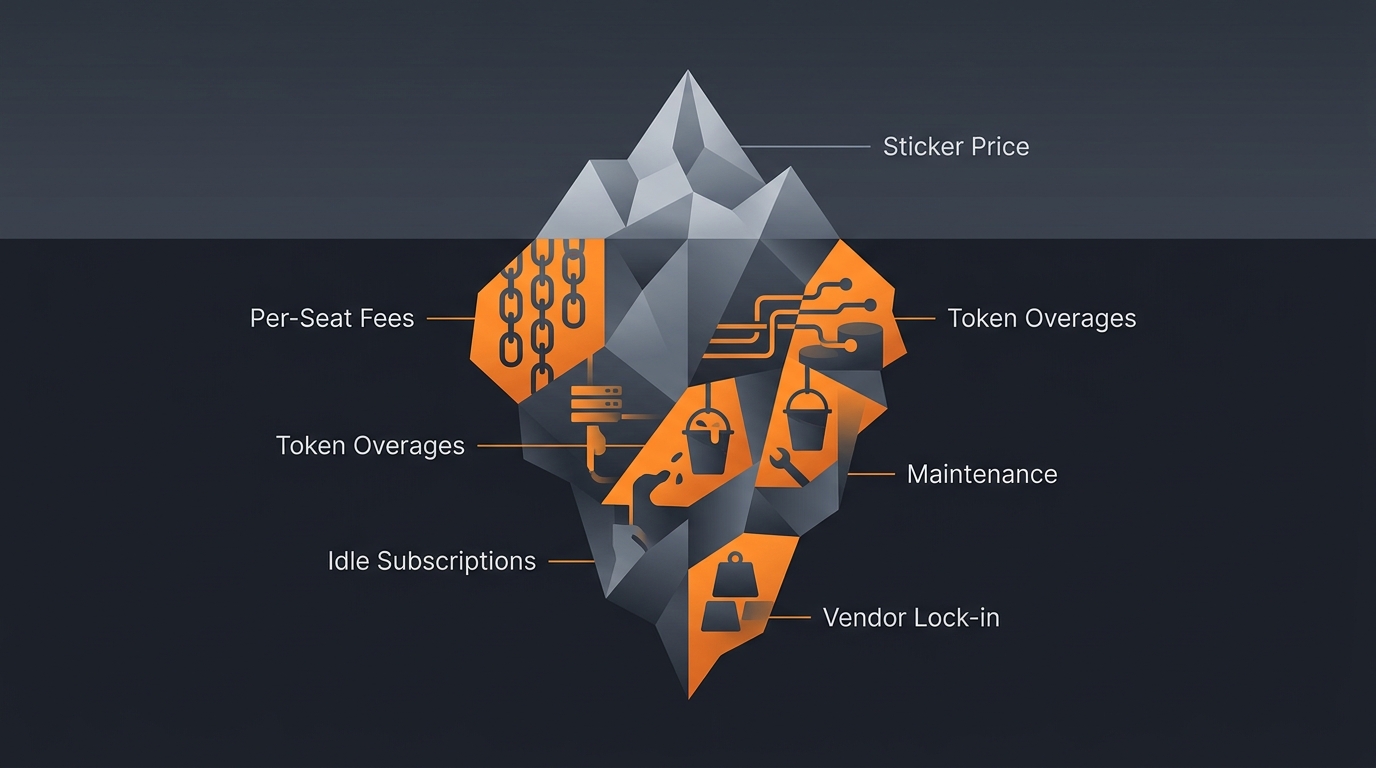
The price you see on an AI agent landing page is rarely the price you pay. The headline number covers a base plan. The real bill arrives later, padded with seats nobody uses, token overages from a busy week, connectors that cost extra, and the quiet hours of engineering time spent keeping the thing alive. None of that shows up in the demo. By the time it shows up on an invoice, you have already committed.
This article walks through every hidden cost category in plain terms: where each one hides, how it sneaks onto the bill, and how to surface it before you sign. We will not quote dollar figures, because every vendor prices differently and the published numbers shift. The goal is to give you a checklist for reading any pricing page honestly. For the broader picture, start with AI agent pricing explained.
Why the sticker price lies
The sticker price is a marketing number, designed to look small next to a competitor's. It typically covers a base tier and a capped allowance, while the costs that actually scale with use sit lower on the page or in a separate billing document. Vendor pricing pages publish these tiers openly, yet the line items that grow with your team and your workload are easy to miss until they compound.
Here is the pattern worth naming. A platform competes on the headline figure because that is what buyers compare, then recovers margin through the variable charges buyers forget to model. So the cheapest sticker price often hides the steepest real cost. The fix is simple to state and easy to skip: model your actual usage against the full price list, not the headline, before you commit. The categories below are where the gap usually lives.
The cheapest headline price often hides the steepest real cost. Vendors compete on the number buyers compare and recover margin through variable charges buyers forget to model: extra seats, token overages, premium connectors, and idle months. Per Gravity internal notes (2026), modeling actual usage against the full price list, not the headline, is the single best defense against a surprise bill.
Per-seat fees and idle subscription cost
Per-seat pricing is the most common hidden multiplier, because it bills for access rather than work. You pay a fixed amount per named user every month, whether that person runs one task or none. Vendor pricing pages list these seat rates plainly, yet teams routinely underestimate the total because seats get added quietly through the year as the team grows, long after the original budget was set.
How seat creep sneaks onto the bill
Seat creep is gradual, which is why it hides. You start with five seats, add two for a new hire, one for a contractor, three for a sibling team that wanted a look. Nobody re-approves the budget; each addition feels trivial. A year later you are paying for double the seats and half of them have not run anything in months. The detection trick is to compare seat count against active users, not headcount. Any seat with no runs is pure waste.
Idle subscription cost: paying while you sleep
Idle cost is the flip side of any flat subscription. You pay the same monthly fee in a quiet month as in a busy one, so every week the agent sits unused is money spent for nothing. Seasonal businesses feel this hardest: the tool that earns its keep in peak season bills identically through the dead months. To surface it, divide your monthly fee by the number of tasks actually run. A high cost-per-task in slow periods is idle cost in disguise. The cost models explained guide breaks down where flat fees help and where they hurt.
Token overages and connector fees
Token and connector charges are the variable costs that punish success. The more your agents work, the more they cost, and the curve is rarely linear. LLM token pricing is published on every model vendor's page, billed per million tokens, so a single complex run that reasons over a long document can cost many times a simple one. Heavy weeks quietly blow past whatever allowance the base plan included.
Why token overages are hard to predict
Token cost is hard to forecast because it depends on the work, not the user. A short prompt that triggers a long chain of tool calls and document reads burns far more tokens than its size suggests. Two users running the same agent on different inputs can produce wildly different bills. The way to surface this is to run a representative sample of real tasks during a trial and watch the token meter, rather than trusting the average a salesperson quotes. Our guide to estimating agent cost before deploying covers exactly that exercise.
Premium connectors and the integration tax
Connectors are the second variable trap. The base plan connects to the easy, popular tools; the integration you actually need, your CRM, your accounting system, that one internal database, often sits behind a premium tier or a per-connector fee. Vendor pricing pages typically list a connector catalog with the premium ones flagged, but it is easy to assume your stack is covered until you hit the paywall mid-setup. Before committing, list every system the agent must touch and confirm each one is in the base tier, not an add-on. Gravity versus Zapier looks at how connector and task pricing diverge between platforms.
The human cost: maintenance and iteration
The largest hidden cost almost never appears on the software invoice: human time. Agents are not set-and-forget. Someone has to write and rewrite the prompts, test changes, watch the runs, and fix things when an upstream API or a website layout shifts under the automation. That labor is real money, and it dwarfs the subscription in many deployments, yet it sits in a different budget line where nobody connects it to the tool.
Maintenance: the cost of staying working
Automations break for reasons outside your control. A vendor changes an API, a form gains a field, a page redesigns, and suddenly the agent that ran clean for months starts failing. Per Gravity internal notes (2026), maintenance is the cost category buyers most consistently leave out of their estimate, precisely because it is invisible until something breaks. To surface it, ask the honest question: when this breaks at 2pm on a deadline, whose afternoon does it eat, and what is that person's hour worth?
Prompt iteration, testing, and monitoring
Getting an agent to behave is iterative, not instant. The first version is rarely the one you keep; it takes rounds of testing, tweaking instructions, and re-running before the output is trustworthy. Then comes monitoring: someone has to notice when a run goes wrong, which on a self-built setup means building observability or reading logs by hand. These hours are easy to dismiss as one-time, but they recur with every change. The build versus buy comparison weighs this engineering time directly.
Failures, rework, and vendor lock-in
The costliest failures are the ones you do not catch. When an agent quietly does the wrong thing, sends a flawed email, miscategorizes data, skips a step, the cleanup costs far more than the run. Rework means a human redoing the task properly plus undoing the damage, and the worst cases erode customer trust in ways no invoice captures. A cheap automation that produces work you cannot trust is not cheap; it is expensive in a column you forgot to add.
How to price the cost of failure
Failure cost scales with how much a mistake matters. An agent drafting internal notes can fail cheaply; an agent touching invoices, contracts, or customer messages cannot. The way to surface this before committing is to ask what the worst plausible mistake costs to fix, then judge whether the platform gives you the checks and human-in-the-loop controls to prevent it. If reliability is an afterthought, the rework bill will not be.
Vendor lock-in: the cost of leaving
Lock-in is a cost you pay later, by not being able to leave cheaply. When your prompts, configurations, and integrations only live inside one proprietary platform, switching means rebuilding everything from scratch. That migration cost, the engineering hours plus the disruption, keeps you paying even when a better or cheaper option appears. To surface lock-in early, ask before you commit: if we left in a year, what would we have to rebuild, and how long would it take? The cost control guide covers structuring deployments to stay portable.
How pay-per-use removes the hidden layer
Pay-per-use attacks the hidden costs at their root by charging only when an agent actually runs. There are no seats to creep, because access is not what you pay for. There is no idle cost, because a quiet month is a cheap month. Gravity uses this model: pricing is credit-based, where one US dollar buys one thousand credits, with no subscription and no per-seat fee, so the bill tracks work done rather than access granted.
The model also folds away the human layer, because the expert who built the agent maintains it for Gravity, not you. When an upstream API shifts, the builder fixes it; you do not staff for maintenance, prompt iteration, or monitoring. Gravity runs the agent, carries the infrastructure cost, and is responsible for the result. You describe the outcome in plain words and the right expert-built agent runs it in about 60 seconds, and you only pay for that run.
None of this makes pay-per-use automatically cheapest for every workload; an agent you run thousands of times an hour may pencil out differently. But it removes the fixed and idle layers entirely, and it makes the bill legible: cost equals usage, full stop. For a structured way to compare models against your own volume, see best AI agent platforms for startups and the broader pricing explainer. When you can see the whole bill, you can choose on it.
Frequently asked questions
What are the hidden costs of AI agents?
The hidden costs of AI agents are the charges beyond the sticker price: per-seat fees that grow with your team, token usage overages, premium connector fees, idle subscription cost, maintenance and engineering time, monitoring, the cost of failures and rework, and migration cost when you switch vendors.
Why is my AI agent bill higher than expected?
Your bill is usually higher because of charges the sticker price hides: extra seats added through the year, token overages on heavy runs, premium connectors billed separately, and idle months you paid for but barely used. Compare what you committed to against what you actually ran.
Do AI agent platforms charge per seat?
Many do. Per-seat pricing bills you for each named user whether or not they run anything that month, so cost climbs as the team grows rather than with the work done. Usage-based models avoid this by charging only when an agent actually runs, regardless of how many people have access.
What is the true cost of running an AI agent?
The true cost is the sticker price plus every hidden category: seats, token overages, connector fees, idle subscription, maintenance time, prompt iteration, monitoring, failures and rework, and eventual migration. Add the human hours, not just the software line, to see what the agent really costs you.
How do I avoid hidden AI agent fees?
Read the full pricing page, ask which features are billed separately, and estimate token and connector usage before you commit. Prefer pay-per-use models that charge only when an agent runs, so idle time and unused seats cost nothing and the bill tracks the work you actually get done.
Three takeaways before you close this tab
- The sticker price is the floor. Model seats, overages, connectors, and idle time against your real usage before you sign.
- Human time is the biggest hidden line. Count maintenance, iteration, monitoring, and rework, not just the subscription.
- Pay only for work done. Usage-based pricing collapses idle and fixed costs and makes the whole bill legible.
Sources
- OpenAI, "API Pricing", per-token model rates published on the pricing page, openai.com/api/pricing. Retrieved 2026-06-14.
- Anthropic, "Pricing", per-million-token model rates published on the pricing page, anthropic.com/pricing. Retrieved 2026-06-14.
- Gravity internal notes on agent cost categories, 2026. Retrieved 2026-06-14.