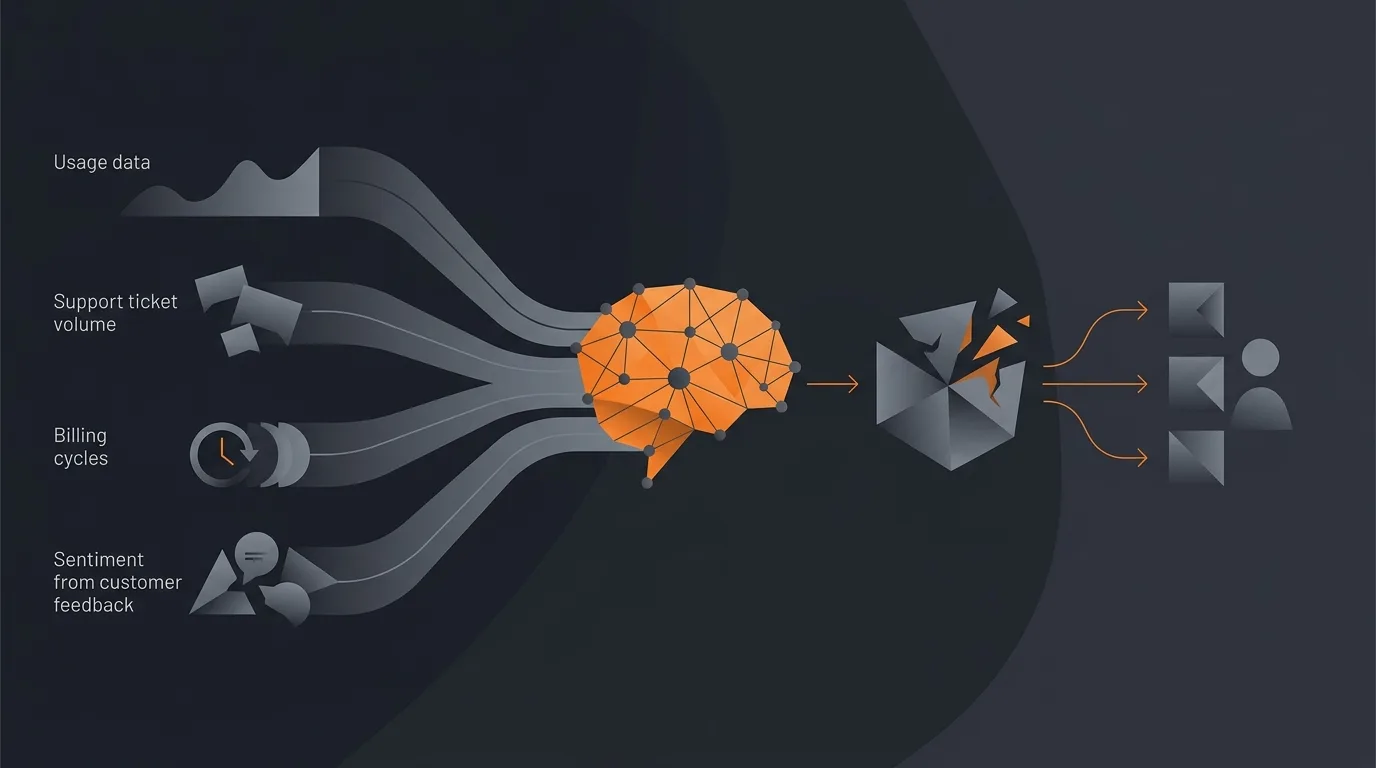
An AI agent can monitor churn risk by watching the signals that precede a cancellation across every system they appear in, scoring each account, and surfacing the ones trending toward churn early enough to act. It is cross-source detection and routing, not an automated retention action. The agent reads usage, support, billing, and sentiment, combines them into one account-level risk view, and hands a ranked at-risk list to a human with the reason attached.
This is deliberately different from recovering a single billing event. If you want to win back a declined charge in your billing system, that is involuntary churn and a narrower job, covered in the post on how to prevent Stripe subscription churn and the one on how to recover failed payments. This post is about the holistic health monitor that watches many signals to catch voluntary churn before the cancellation is even filed.

What churn-risk monitoring actually is
Churn rarely arrives as a surprise. By the time an account clicks cancel, the warning signs have usually been visible for weeks: logins tapered off, a few seats went dormant, support tickets piled up without a clean resolution, an invoice bounced, and the last survey came back lukewarm. The problem is not that the signals were hidden. The problem is that they were scattered across four different tools, and nobody was watching them together.
Churn-risk monitoring is the practice of watching those signals across every system they live in, scoring each account on a single risk view, and flagging the accounts trending the wrong way while there is still runway to respond. The Harvard Business Review has long noted that keeping the right customers is far cheaper than acquiring new ones, which is exactly why catching risk a few weeks early is worth the effort.
The key distinction is detection versus reaction. Reactive recovery waits for a discrete event, a failed charge or a downgrade, and then responds to that one event. Early detection reads the slow drift across many sources and raises a hand before any single event forces the issue. An agent is well suited to detection because it can read several tools on a schedule, hold the whole picture in view, and apply the same scoring logic to every account without getting tired or distracted.
The four churn signals worth watching
Four signal categories predict most churn: falling product usage, rising support friction, billing trouble, and souring sentiment. An agent watches all four and combines them into one account-level risk score. The taxonomy is reusable: whatever your stack, you can map your own tools onto these four buckets and get a complete-enough picture. No single signal is decisive; the pattern across them is what matters.
Usage signals
Usage is the earliest and most honest signal because it reflects whether the product is still part of the customer's daily work. The agent watches for a drop in login frequency, a decline in active seats, features that were adopted and then abandoned, and a falling share of the workflow the product used to cover. A healthy account that quietly goes quiet is often weeks ahead of any complaint. Most churn is preceded by an observable engagement decline, which is why usage tends to lead the other three signals.
Support signals
Support friction is the sound of a customer struggling. The agent watches for a spike in ticket volume, escalations that sat unresolved, repeat tickets on the same theme, and a negative shift in the tone of messages. A burst of frustrated tickets followed by silence is a classic pre-churn shape. The same support inbox an agent can watch for risk signals is the one a separate Intercom auto-responder agent can triage, so the support-ticket stream does double duty.
Billing signals
Billing is where intent gets expressed in money. The agent watches for failed payments, downgrade requests, plan-limit friction, and shifts from annual to monthly that signal a hedge. Billing trouble is a strong signal precisely because it is concrete, but on its own it only catches the account once it has already started to leave. That is why billing here is one input among four, not the whole system. For acting on a single billing event in isolation, the dedicated subscription churn prevention workflow is the right tool; in this monitor, billing is one stream feeding the combined score.
Sentiment signals
Sentiment is the qualitative layer the other three miss. The agent reads survey scores, the tone of review and email replies, and the language in support threads, then folds that into the account view. A customer can be active, paying, and quiet on support while still souring in every reply they send. Pulling sentiment from across your channels is a job in itself, covered in the post on how to analyze customer feedback and sentiment; here, sentiment is one of four churn signals rather than the standalone output.
How to set up a churn-monitoring agent
Pick the signals you can actually read from your tools, define a simple risk score, set the agent to run weekly, and route the ranked at-risk list to the owning account manager with the reason attached. You do not need a data warehouse or a dedicated customer-success platform to start. You need a clear description of what to watch and where it lives.
- Inventory the readable signals. List the tools you already use and which of the four categories each one covers: product analytics for usage, the support tool for tickets and tone, the billing system for payment and plan events, and the survey or inbox for sentiment. Start with whatever you can read today; you can add sources later.
- Define a simple weighted score. Assign each signal category a weight that reflects how much it predicts churn in your business. Many teams weight usage decline most heavily because it leads the others, then layer support, billing, and sentiment on top. Keep it simple at first; a transparent score you understand beats a black box you do not.
- Set the run cadence to weekly. Weekly is the sweet spot for most account books. It is frequent enough to catch a drift within days of it appearing, and infrequent enough that the noise of a single quiet day does not trigger a false alarm. You can run on demand before a renewal conversation when you want a fresh read.
- Define the output. The agent should produce a ranked list of at-risk accounts, each with its risk score, the specific signals driving the flag, and the owning account manager. The reason is the part that makes the flag actionable: "logins down, two open escalations, last survey negative" tells a human what to do; a bare score does not.
- Route it to the human. Send the list to the right person rather than a shared channel where it gets ignored. The agent's job ends at a clear, attributed handoff. Keeping a person in the decision is the whole point, which is why it helps to add a human in the loop to the agent rather than wiring it to take action on its own.
The weekly output works well as a short digest. If your team already reads a Monday summary, the at-risk list can ride along inside it; a daily or weekly rollup agent is a natural place to surface the ranked accounts so the list lands where people already look. On Gravity, the entire setup is a plain-language description of the outcome rather than a pipeline you build and babysit.
To picture the output, imagine a small scoreboard: accounts down the side, the four signal categories across the top, and a combined risk score in the final column.
| Account | Usage | Support | Billing | Sentiment | Risk score |
|---|---|---|---|---|---|
| Northwind Co | Logins down sharply | 2 open escalations | On time | Last survey negative | High |
| Brightline Labs | Seats dormant | Quiet | Downgrade requested | Neutral | Medium |
| Harbor Group | Steady | Routine tickets | On time | Positive | Low |
The value is that one row tells a human the whole story: which account, what is wrong, and how urgent. That is the difference between a monitor and a spreadsheet nobody updates.
Acting on a churn flag is the human's job
When the agent flags an account, a human reviews the reason and chooses the play. The save-play menu is short and familiar: a check-in call to reconnect, an onboarding refresh if the team never fully adopted, a billing fix if the trouble is a stuck invoice, an executive touch for a strategic account, or nothing at all if the flag reads as a false alarm. The agent has done the detection; the person does the judgment.
Here is the restraint that matters and is rarely stated: do not let the agent auto-discount or auto-email at-risk accounts. It is tempting to close the loop and have the system fire a retention offer the moment risk crosses a threshold. It backfires. Discounts sent on a trigger train customers to threaten churn for perks, and a templated "we noticed you have been quiet" email to an account that was merely on holiday reads as creepy rather than caring. Proactive customer success works when a person reaches out with context; it fails when a bot reaches out on a rule.
So the line is firm: the agent detects and routes, the human decides and acts. The score is a prompt for a conversation, not an automated cancellation, discount, or apology. That restraint is also what keeps the system trustworthy over time, since the team learns the flags are worth reading rather than something to mute. The same detect-and-route pattern shows up across agents for SaaS customer success, where the agent does the watching and the CSM keeps the relationship.
What a churn-monitoring agent cannot do
Honest limits keep expectations right. An agent cannot read signals it has no access to. If your usage data lives in a tool the agent is not connected to, that blind spot stays a blind spot, and the score is only as complete as the sources behind it. It also cannot fix the product problem that is actually causing the churn. It can tell you that three accounts soured right after a feature changed; it cannot ship the fix.
It does not diagnose root cause or run your retention strategy either. It surfaces a pattern and a ranked list; deciding why the pattern exists and what the right structural response is remains human work. And no agent guarantees a prediction. Some flagged accounts will renew happily, and the occasional account will churn with no warning at all. Treat the score as one input to a human judgment, not a verdict, and the monitor earns its keep. Pushed past detection into automated decisions, it starts doing harm. If you are still deciding whether this kind of reasoning over data even counts as an agent, the glossary and the primer on what an AI agent is draw the line between a scheduled script and an agent that reads sources, scores, and routes.
How Gravity handles churn-risk monitoring
Gravity is an AI agent platform. You describe the monitoring outcome in plain words: watch these usage, support, billing, and sentiment signals across the tools where they live, score each account weekly, and send the ranked at-risk list with reasons to the owning account manager. An expert-built agent runs that for you and returns the finished result in about 60 seconds, no pipeline to build and no dashboard to maintain.
Each week the agent reads your connected sources, combines the four signal categories into one risk score per account, flags the accounts trending toward churn, attaches the specific reason for each flag, and routes the list to the right person. You review and run the save play. You do not log into four tools or stitch the signals together by hand. Pricing is subscription-based: the free tier covers one agent, and paid plans from $20/month include a lot of usage, so monitoring a book of accounts on a weekly cadence sits well within a starter plan for a small team.
Churn monitoring is a strong outcome to describe first because the value is obvious within the first run: a list of the accounts most likely to leave, with the reason, in time to do something about it. If you are new to the platform, the walkthrough on how to set up your first AI agent shows how to go from a plain description to a running agent, and the broader piece on tracking success metrics covers how to measure whether the monitor is actually moving retention. Founders running lean will find more context in the post on AI agents for SaaS founders.
FAQ
Can an AI agent predict customer churn?
It can flag elevated churn risk by spotting patterns across usage, support, billing, and sentiment earlier than a human watching one tool would. It surfaces risk and explains why an account looks shaky; it does not guarantee a prediction. A human still reads the flag and decides how to respond, so treat the score as a prompt rather than a verdict.
What signals indicate churn risk?
The strongest are falling product usage, such as fewer logins or abandoned features, rising support friction like ticket spikes and unresolved escalations, billing trouble like failed payments or downgrade requests, and souring sentiment in surveys or messages. No single signal is decisive on its own. The pattern across all four is what actually predicts a coming cancellation.
How is churn-risk monitoring different from failed-payment recovery?
Failed-payment recovery acts on one billing event, a declined charge, to prevent involuntary churn. Churn-risk monitoring watches many signals across many tools to catch voluntary churn early, before a cancellation, while there is still time to intervene. One reacts to a single event in the billing system; the other detects a cross-source pattern and routes it to a human.
Should the agent automatically save at-risk customers?
No. Auto-discounting or auto-emailing at-risk accounts can backfire and train customers to threaten churn for perks. The agent should detect and route, surfacing a ranked list with the reason attached. A human should choose and run the save play, whether that is a check-in call, an onboarding refresh, a billing fix, or nothing at all if it reads as a false alarm.
How much does churn monitoring with an AI agent cost?
Gravity uses subscription pricing: a free tier at $0/month covers one agent, and paid plans start at $20 a month with a lot of usage included. A weekly churn monitor for a small team fits comfortably inside a starter plan's included usage, and extra usage is available as your book grows. Cost tracks how many signals and accounts you monitor and how often the agent runs, not a fixed seat license.